RealTimeBox · Embedded Displays

Simple control.
Visible instantly.

Why use a complete, expensive control system if you only want to count, display or switch a relay? With wireless RTB displays and our own embedded firmware, we make production counts and process information instantly visible — without installing apps. Operators see their results locally, while managers can monitor via the cloud.

Real-time production counts locally and in the cloud
Switch relays easily
Wireless, energy-efficient and with no app installation
Expandable through one open real-time data layer
One BoxOne NetworkOne Data Layer
RTB Embedded · Line 01Online
Production today
1.284 stuks
Target: 1,500 units
Relais 1ON
Relais 2OFF
AlarmOK
Start/StopRUN
43stuks/uur
98,4%uptime
12open events
⚡

Digital I/O

Compact inputs and outputs for counting, signals and simple switching functions.
🖥️

Embedded display

Immediate local visibility without a PC, complex HMI or heavy software package.

🔌

I/O & relais

Switch lamps, valves, signals or other non-safety-critical functions.

☁️

Open data layer

Connect data, dashboards and modules within the same RealTimeBox network.

RTB Displays · Embedded firmware

Smart production displays without complicated software

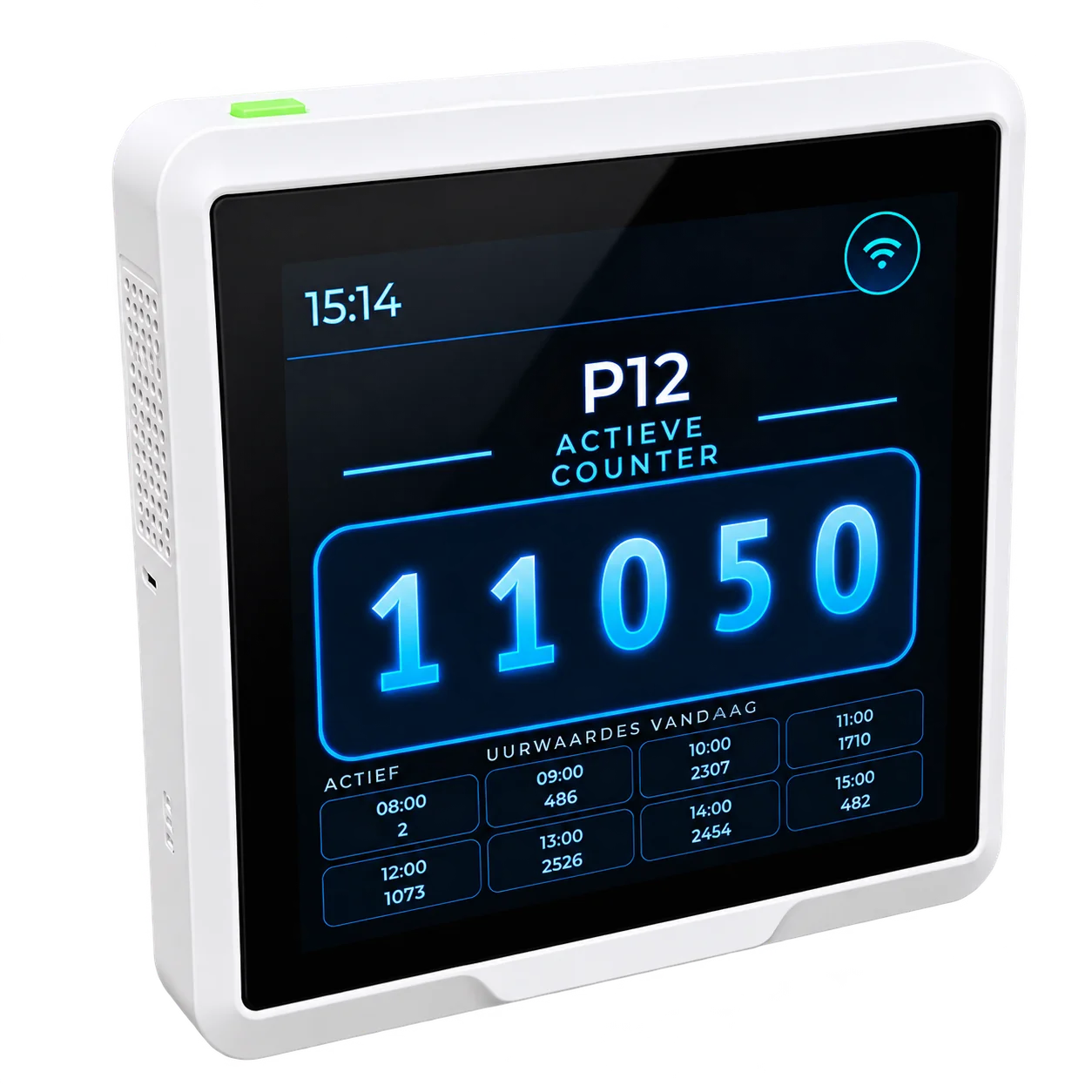
RealTimeBox supplies compact wireless displays with embedded firmware: the required functionality sits directly in the device. There is no need to install an app or perform unnecessary software updates all the time. The system is quick, clear and easy to use.

📱 No apps needed

The display works independently with built-in firmware. No separate app or extensive software installation is required at the workplace.

🔋 Low energy consumption

Suitable for energy-efficient, wireless applications. Ideal for workplaces and locations without a readily available power point, depending on the selected power supply and connection.

⚡ Operational within an hour

With a pre-configured RTB solution, you can usually start measuring, counting and gaining insight within an hour at a suitable location.

From the work floor to the cloud

The operator sees production. The manager keeps the overview.

Many of our RTB displays are used as production counters. Right at the workstation, the operator sees how many products have been made, what the target is and how production is progressing. At the same time, the devices are connected to the cloud so managers and supervisors can monitor progress remotely. That gives more control over production, without extra administrative actions.

1 · Measure at the workstationSensors or counters record production.
2 · Visible immediatelyThe wireless display shows the current counts to the operator.
3 · Monitor through the cloudManagers track production data and KPIs in one central overview.
Simplicity can be smart

For tasks where a full control system is overkill

Many production processes do not need a heavy PLC architecture. For simple visualisation, counting, status display and non-safety-critical switching functions, a compact embedded solution can be much cheaper and faster.

01

Production counter

Show in real time how many products, cycles, boxes or trays have been processed.

  • Day, shift and order counting
  • Target versus actual
  • Historical data
02

Status display

Make machine or line status instantly visible to the operator and team leader.

  • Running / stop / fault
  • Warnings
  • KPIs on one screen
03

Switch relays

Switch simple outputs without a complete PLC installation.

  • Signal lamps
  • Non-critical auxiliary equipment
  • Start/stop permissions
04

Sensor information

Connect simple sensors directly and present values locally and online.

  • Temperature
  • Approach / counting
  • Level / status
05

Operator input

Let employees register choices, reasons or production feedback.

  • Touch buttons
  • Order selection
  • Reason codes
06

Expand later

Start small and later connect extra screens, I/O, sensors or cloud functions.

  • Modular hardware
  • API / MQTT
  • Meerdere locaties
Important: for machine safety, emergency-stop chains and functions that require certified safety controls, appropriate industrial control remains necessary. Here, RealTimeBox focuses on practical visualisation and simple automation around the process.
No unnecessary complexity

From expensive island solution to modular digital layer

Traditional approach for a simple task

×PLC, HMI, programming software and engineering for only a counter or status display.
×Higher purchase and integration costs than the function justifies.
×Data often remains local in one cabinet or on one display.
×Expansion requires new hardware and engineering again.
→

Embedded with RealTimeBox

✓Compact display with exactly the I/O and functions required.
✓Simple web interface and quick configuration.
✓Real-time data directly available in the same open network.
✓Add new modules later without rebuilding the whole system.
Open network

One simple module can later become a complete network

An embedded display does not have to be an island. Through open protocols, we connect displays, sensors, relay modules and dashboards to the same data layer. That allows you to start per application and expand step by step.

MQTTREST APIWi‑Fi / EthernetLoRaWANBLEDigital I/ORelaisDashboards

Embedded display

Local display
Operator input

↔

RealTimeBox

Data
Rules
Dashboard

↔

Expansion

Extra I/O
Sensors
Other lines

The foundation

RealTimeBox as a compact hardware and data layer

The RTB Box forms the practical foundation under the embedded application. Customer-specific I/O, sensors and connectivity are combined in one compact, scalable solution.
Vendor-independentRealtimeModulairOpen standard
RealTimeBox logo
What does it deliver?

Control does not need to be expensive if the task is simple

The benefit is not only in hardware cost, but also in less engineering, faster implementation and the ability to start small.

↓

Less hardware

Use only what is truly needed for the function.

⚡

Live faster

Pre-configured displays can usually be operational within an hour.

↗

Grow modularly

Add sensors, screens and cloud functions later.

☁️

No data island

Local operation and central real-time information.
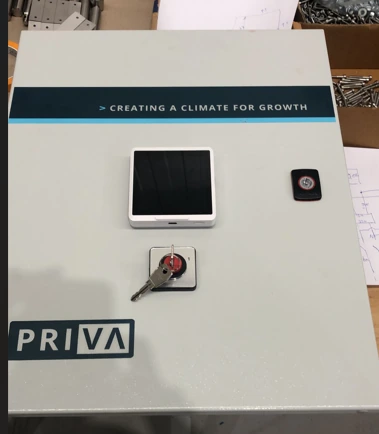
Control cabinet with a compact display, button and key switch
Hardware in practice

A compact display on the control cabinet.

A practical example of a cabinet with a compact display and physical controls. The display gives information a clear place at the workstation.

Partners

Our partners

Netvion and Seeed Studio are partners of RealTimeBox.

Embedded Display Project

Which simple function would you like to make smarter?

From a counter or status display to relay control and cloud connection: we build a compact solution around your application.

Discuss the project →